LCDInfo.com Forum Index LCDInfo.com
www.lcdinfo.com
 
 FAQFAQ   SearchSearch   MemberlistMemberlist   UsergroupsUsergroups   RegisterRegister 
 ProfileProfile   Log in to check your private messagesLog in to check your private messages   Log inLog in 

PCD8544 (Nokia LCD)
Goto page 1, 2, 3 ... 10, 11, 12  Next
 
Post new topic   Reply to topic    LCDInfo.com Forum Index -> Drivers
View previous topic :: View next topic  
Author Message
Henri


Joined: 05 May 2002
Posts: 2049
Location: Lappeenranta, Finland

PostPosted: Fri Jan 02, 2004 16:35    Post subject: PCD8544 (Nokia LCD) Reply with quote

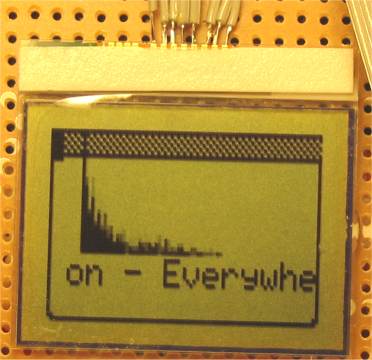
I have a Nokia 3310 display interfaced to LPT port and experimental LCDInfo driver for it running.


------------------------------------------------


Last edited by Henri on Wed Sep 22, 2004 11:40; edited 8 times in total
Back to top
View user's profile Send private message Send e-mail
DarkElf


Joined: 18 Feb 2003
Posts: 118
Location: Angers, France

PostPosted: Fri Jan 02, 2004 18:27    Post subject: Reply with quote

you are THE man Henri Smile
_________________
Shadows move where light should be
Back to top
View user's profile Send private message Send e-mail MSN Messenger
Delfins


Joined: 13 Jul 2003
Posts: 12
Location: Riga, Latvia

PostPosted: Sat Jan 03, 2004 9:14    Post subject: very good :) Reply with quote

nice look - what is the next you are going to connect to LPT ? Smile
_________________
Grrr....
Back to top
View user's profile Send private message
DarkElf


Joined: 18 Feb 2003
Posts: 118
Location: Angers, France

PostPosted: Sat Jan 03, 2004 12:53    Post subject: Reply with quote

i have a i friend who want to connect is old 386 laptop to his new comp lpt port, that would do a big lcd.
He was asking if lcdstudio could managed it, of course the answer is no, but maybe lcdinfo could do it... Very Happy
_________________
Shadows move where light should be
Back to top
View user's profile Send private message Send e-mail MSN Messenger
rudi Grobler


Joined: 02 Dec 2003
Posts: 107
Location: South Africa

PostPosted: Mon Jan 05, 2004 15:42    Post subject: Reply with quote

Can you please mail me some detail of how to connect the lcd? I have a old 3310 and a old 6110. It would be very nice if i can use them!!!

Very impressive work!!!
_________________
Rudi Grobler
Back to top
View user's profile Send private message Send e-mail
rudi Grobler


Joined: 02 Dec 2003
Posts: 107
Location: South Africa

PostPosted: Mon Jan 05, 2004 15:48    Post subject: Reply with quote

What is the resolution of this screen???
_________________
Rudi Grobler
Back to top
View user's profile Send private message Send e-mail
rudi Grobler


Joined: 02 Dec 2003
Posts: 107
Location: South Africa

PostPosted: Tue Jan 06, 2004 11:10    Post subject: Reply with quote

I just did a search on the internet for this controller, I just want to answer some questions I had:

1) The resolution is 84x48
2) Henri, please correct me if I am wrong but it looks like the controller uses serial data transmition???
3) The controller is embedded on the board
_________________
Rudi Grobler
Back to top
View user's profile Send private message Send e-mail
DarkElf


Joined: 18 Feb 2003
Posts: 118
Location: Angers, France

PostPosted: Tue Jan 06, 2004 11:26    Post subject: Reply with quote

yes to the last two questions Wink (thx Henri for the infos Wink)
_________________
Shadows move where light should be
Back to top
View user's profile Send private message Send e-mail MSN Messenger
rudi Grobler


Joined: 02 Dec 2003
Posts: 107
Location: South Africa

PostPosted: Tue Jan 06, 2004 11:40    Post subject: Reply with quote

One more think I just read:

The 3310 lcds are actualy called LPH7779, LPH7677 or LPH7366.

The LPH7779 and LPH7677 have 8 pins:

pin1 V+
pin2 Sclk
pin3 Sda
pin4 DorC
pin5 Cs
pin6 Gnd
pin7 Vout(DC/DC voltage converter)
pin8 Reset

The LPH7366 has 9 pins:

pin1 V+
pin2 Sclk
pin3 Sda
pin4 DorC
pin5 Cs
pin6 Osc (32768Hz external clock)
pin7 Gnd
pin8 Vout(DC/DC voltage converter)
pin9 Reset
_________________
Rudi Grobler
Back to top
View user's profile Send private message Send e-mail
Henri


Joined: 05 May 2002
Posts: 2049
Location: Lappeenranta, Finland

PostPosted: Tue Jan 06, 2004 13:49    Post subject: Reply with quote

I think 3310 uses the 8 pin display and 5110/6110 might have the 9 pin version.

And yes the display uses serial protocol and I'm bitbanging the bits through a parallel port pin.

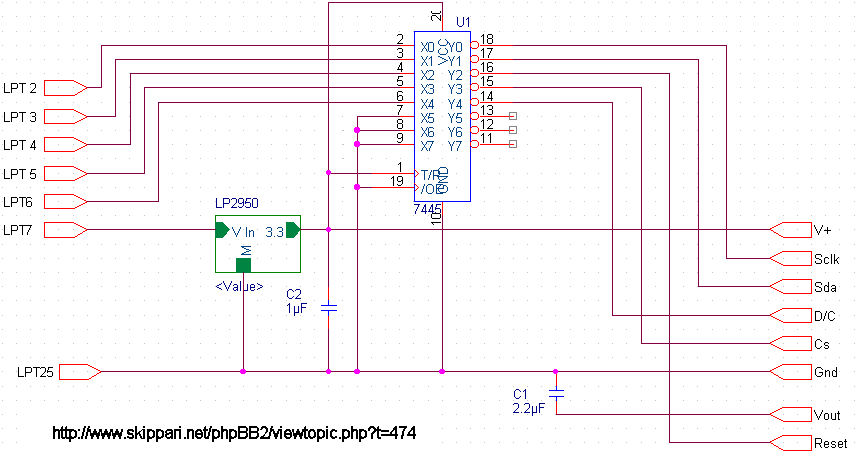
I have the display connected to the parallel port data pins and I'm also powering the display from the parallel port. I'm using a LP2950 regulator to get the +3.3v voltage from the parallel port's +5v. For the 5v to 3.3v logic level conversion I'm using a 74LCX245 chip that seems to fit this purpose well. The reason I chose these components is that I already had them so I didn't need to go looking for anything else. There are also many other ways to handle the level conversions. I believe that the PCD8544 chip could also work fine at 5v logic levels but I haven't tested that and it's out of the normal working specs of the chip. So you're on your own if you test that.

This is how I have the display interfaced to the parallel port:
LPT pin 2 <-> SCLK 1
LPT pin 3 <-> SDA 2
LPT pin 4 <-> RES 4
LPT pin 5 <-> CE 8
LPT pin 6 <-> D/C 16
LPT pin 7 <-> POWER 32

As you can see I'm taking power from pin 7 for all the parts I mentioned in this post. It has been working fine for me but I take no responsibility if you kill your parallel port or something else doing to same connections.

I have connected the VOUT pin of the display through 2.2uF capacitor to ground. PCD8544 datasheet says 1uF is minimum. Also I have a 1uF capacitor at the output of LP2950.

--
There has been some confusion lately and I've been getting lots of mails asking for help connecting different nokia displays to lpt port.
This schematic is made based on my above description:

PS.
Most of the questions I've been getting by email have been already answered in this thread so if you have some questions you should read this through first. Also it's recommended to ask the questions here in the forum if there isn't some reason for private emails.


Last edited by Henri on Sat May 15, 2004 14:10; edited 2 times in total
Back to top
View user's profile Send private message Send e-mail
beef02


Joined: 07 Jan 2004
Posts: 1

PostPosted: Wed Jan 07, 2004 20:54    Post subject: Reply with quote

hello
could you give us the driver to control this screen?
THX
Back to top
View user's profile Send private message
Henri


Joined: 05 May 2002
Posts: 2049
Location: Lappeenranta, Finland

PostPosted: Wed Jan 07, 2004 22:43    Post subject: Reply with quote

The driver to use the display is included with LCDInfo now so there's no need to ask it from me anymore.

http://www.skippari.net/phpBB2/viewtopic.php?t=387

--

Until I get to include the driver to the LCDInfo package you can email me and I'll send you the latest driver.


Last edited by Henri on Tue Jun 22, 2004 12:26; edited 2 times in total
Back to top
View user's profile Send private message Send e-mail
DarkElf


Joined: 18 Feb 2003
Posts: 118
Location: Angers, France

PostPosted: Thu Jan 08, 2004 12:21    Post subject: Reply with quote


_________________
Shadows move where light should be
Back to top
View user's profile Send private message Send e-mail MSN Messenger
Henri


Joined: 05 May 2002
Posts: 2049
Location: Lappeenranta, Finland

PostPosted: Thu Jan 08, 2004 12:47    Post subject: Reply with quote

I'm taking the power for the whole thing from LPT port pin 7 but it's also possible to feed the circuit from other power source. Just remember to leave LPT pin 7 not connected.

I think that as long as the input voltage to LP2950 is >3.5v the circuit should work fine.
Back to top
View user's profile Send private message Send e-mail
Shark


Joined: 11 Jan 2004
Posts: 1
Location: Finland, Pori

PostPosted: Sun Jan 11, 2004 21:53    Post subject: Reply with quote

How I can connect my old Nokia 3210 LCD on paraller/serial-port?
Back to top
View user's profile Send private message Send e-mail MSN Messenger
Display posts from previous:   
Post new topic   Reply to topic    LCDInfo.com Forum Index -> Drivers All times are GMT + 2 Hours
Goto page 1, 2, 3 ... 10, 11, 12  Next
Page 1 of 12

 
Jump to:  
You cannot post new topics in this forum
You cannot reply to topics in this forum
You cannot edit your posts in this forum
You cannot delete your posts in this forum
You cannot vote in polls in this forum


Powered by phpBB © 2001, 2005 phpBB Group